> ## Documentation Index
> Fetch the complete documentation index at: https://docs.bytebase.com/llms.txt
> Use this file to discover all available pages before exploring further.
# Schema Editor
Schema Editor provides a visual interface for modifying database structures without writing SQL.
The Schema Editor is only available for **MySQL**, **TiDB**, and **PostgreSQL**. For other
[supported databases](/introduction/supported-databases#schema-management), the **Schema Editor**
button is not shown and schema changes are made with raw SQL.
## Getting Started
The Schema Editor lives inside the change-plan editor. When you create or edit a schema change, the plan's SQL statement section shows a **Schema editor** button — click it to edit the schema visually instead of writing SQL.
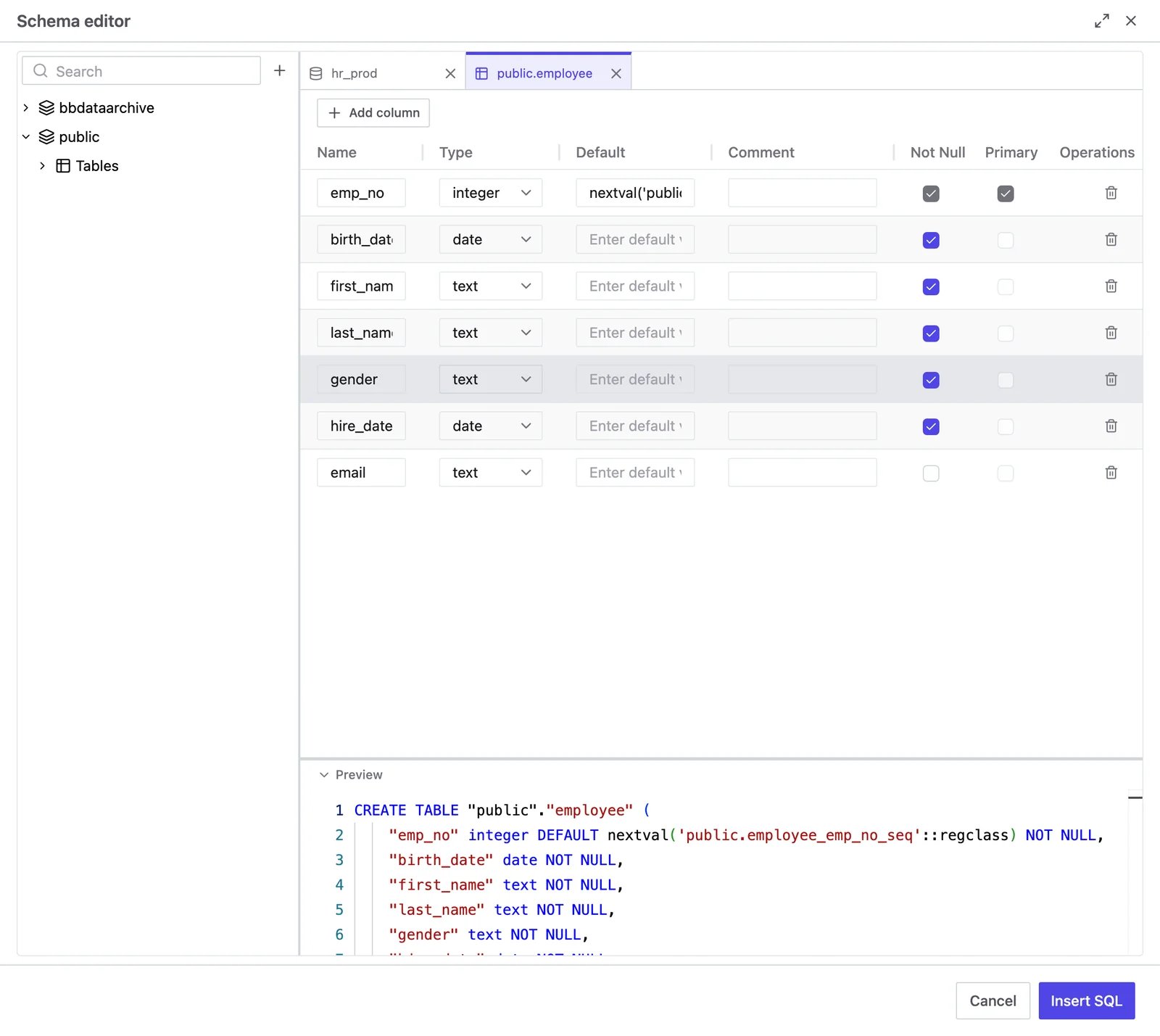
The editor opens as a side panel: an object tree on the left — with a search box, a **+** button, and right-click menus — and the editing pane on the right. As you make changes, the equivalent SQL is generated and shown live.
 ## Basic Operations
### Tables
* **Create**: click **New table**, or right-click a schema's **Tables** node (or use the **+** button).
* **Drop**: click the trash icon on a table row, or right-click the table > **Drop table**. Use **Restore** to undo before applying.
* **Rename**: right-click a table that has pending changes > **Rename table**.
### Columns
* **Add**: select a table and click **Add column**.
* **Edit**: change column properties inline in the grid — name, type, default value, comment, **Not Null**, and **Primary** key. Primary keys can only be changed on newly created tables.
### Indexes and partitions
For **MySQL** and **TiDB**, open a table and switch to the **Indexes** or **Partitions** tab, then click **Add index** or **Add partition**.
### Schemas
For **PostgreSQL**, right-click the database node > **Create schema**, or a schema node > **Drop schema** / **Restore**.
## Apply Changes
Click **Insert SQL**. The Schema Editor generates the DDL for your changes and inserts it into the plan's SQL statement. From there, review and run the plan as usual to roll out the change.
## Basic Operations
### Tables
* **Create**: click **New table**, or right-click a schema's **Tables** node (or use the **+** button).
* **Drop**: click the trash icon on a table row, or right-click the table > **Drop table**. Use **Restore** to undo before applying.
* **Rename**: right-click a table that has pending changes > **Rename table**.
### Columns
* **Add**: select a table and click **Add column**.
* **Edit**: change column properties inline in the grid — name, type, default value, comment, **Not Null**, and **Primary** key. Primary keys can only be changed on newly created tables.
### Indexes and partitions
For **MySQL** and **TiDB**, open a table and switch to the **Indexes** or **Partitions** tab, then click **Add index** or **Add partition**.
### Schemas
For **PostgreSQL**, right-click the database node > **Create schema**, or a schema node > **Drop schema** / **Restore**.
## Apply Changes
Click **Insert SQL**. The Schema Editor generates the DDL for your changes and inserts it into the plan's SQL statement. From there, review and run the plan as usual to roll out the change.